Features
Words of Jesus highlighted
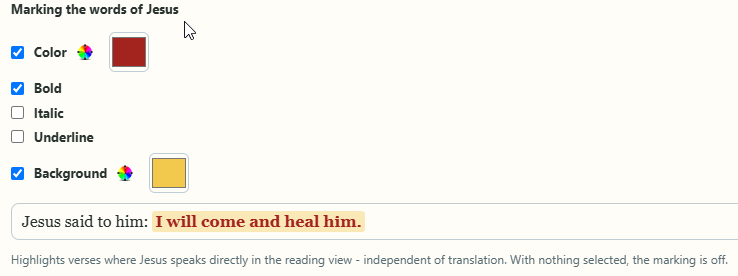
Red like in many a family Bible – or entirely different: you decide how the words of Jesus appear in the text.
Your own style
Under Settings › Bibles › Marking the words of Jesus you put the highlighting together: colour, bold, italic, underlined or a coloured background – combine them freely, with a preview. Changes apply immediately. If you prefer no highlighting, simply leave everything unticked.
In every translation
The marking works regardless of the Bible you choose – also when reading several translations side by side, in your collections and in reading plans. Verses in which Jesus speaks only in part are highlighted more subtly.
On top of that, the words of Jesus are being refined word by word, translation by translation: then only the spoken words are marked, not the introduction before them.

Words of Jesus in smart lists
Your own smart lists can filter by the words of Jesus – for example all collected verses in which Jesus speaks, or exactly those in which he doesn’t. A few clicks give you a memory list with his words only.