Features
Everything about a verse
One click on a verse shows everything you have collected, noted and learned about it – in one place.
One way in for every passage
Whether you are reading a chapter, going through a collection or looking at search results: the reference on every verse card and the menu of every verse lead to the same overview. Even in continuous reading text, where there is no separate button, it is just one click away.
What you find there
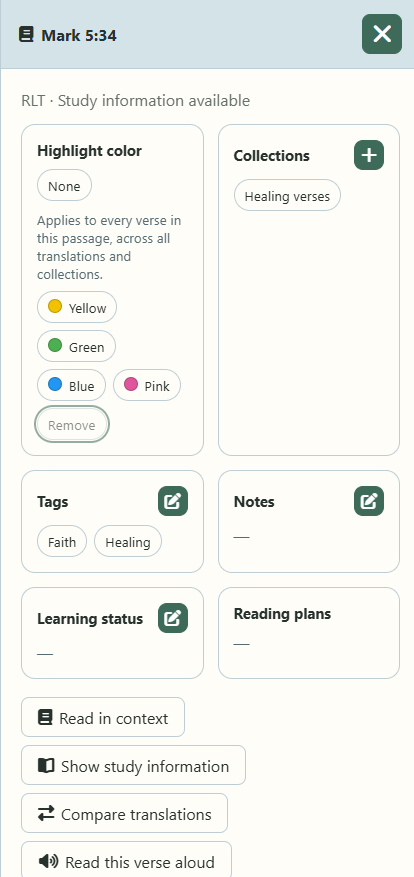
- Collections and tags that contain the passage – one click takes you to the collection, with the verse already highlighted.
- Your notes on this verse.
- Learning status: how well you know the verse, when you last reviewed it and when it is due again.
- Reading plans that include the passage.
- Study information shown for the passage.
Where there is nothing yet, you see a quiet dash instead of long notices.
Act right away
From here you add the passage to a collection, write a note, read it in context, compare translations or have it read aloud.
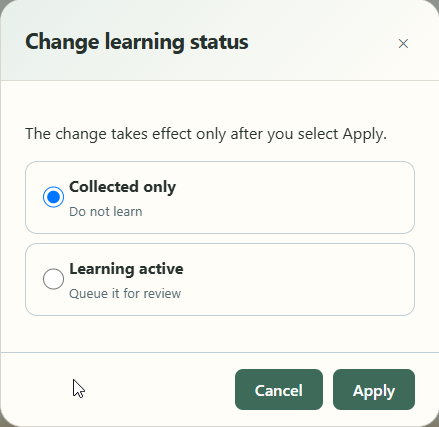
You choose the learning status deliberately: collected only, learn actively with your progress so far, or learn actively and start over. Nothing changes until you confirm.